HTC One X

HTC One X

Divert calls to alternative number - HTC One X

Read help info

Incoming calls can be diverted to a number of your choice. Follow these instructions to divert calls to alternative number.

Press the menu icon.
Step 1 of 14

Find "Call forwarding"

Press the menu icon.
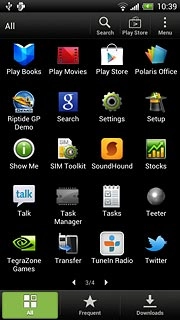
Press Settings.
Step 2 of 14

Find "Call forwarding"

Press Settings.

Press Call.
Step 3 of 14

Find "Call forwarding"

Press Call.

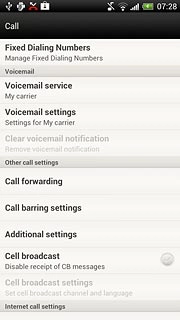
Press Call forwarding.
Step 4 of 14

Find "Call forwarding"

Press Call forwarding.

HTC One X
Step 5 of 14

Select divert type

The current settings will be displayed.

Press one of the following options:Always forward
Step 6 of 14

Select divert type

Press one of the following options:
Always forward

Forward when busy
Step 7 of 14

Select divert type

Forward when busy

Forward when unanswered
Step 8 of 14

Select divert type

Forward when unanswered

Forward when unreachable
Step 9 of 14

Select divert type

Forward when unreachable

Key in the required number.If you selected Forward when unanswered in step 2:
Step 10 of 14

Divert calls to alternative number

Key in the required number.
If you selected Forward when unanswered in step 2:
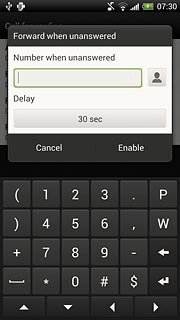
Press the field below Delay.
Step 11 of 14

Divert calls to alternative number

Press the field below Delay.
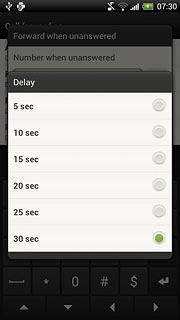
Press the required delay.
Step 12 of 14

Divert calls to alternative number

Press the required delay.
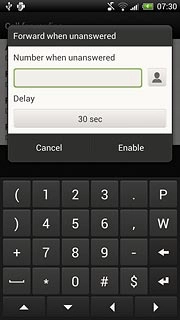
Press Enable.
Step 13 of 14

Divert calls to alternative number

Press Enable.
Press the Home key to return to standby mode.
Step 14 of 14

Exit

Press the Home key to return to standby mode.

Find "Call forwarding"

Press the menu icon.
Press Settings.
Press Call.
Press Call forwarding.

Select divert type

The current settings will be displayed.
HTC One X
Press one of the following options:
Always forward
Forward when busy
Forward when unanswered
Forward when unreachable

Divert calls to alternative number

Key in the required number.
If you selected Forward when unanswered in step 2:
Press the field below Delay.
Press the required delay.
Press Enable.

Exit

Press the Home key to return to standby mode.

Thank you for your evaluation!

Get information on...

Or select...

Another device