Nokia 3310 (2017)

Nokia 3310 (2017)

Divert calls to your voicemail on your Nokia 3310 (2017) Proprietary OS

Read help info

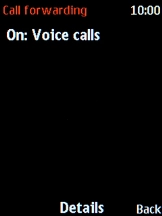
To receive voice messages, you need to divert your calls to your voicemail. Before you can divert calls to your voicemail, you need to save the voicemail number.

Press the Navigation key.
Step 1 of 10

1. Find "Call forwarding"

Press the Navigation key.

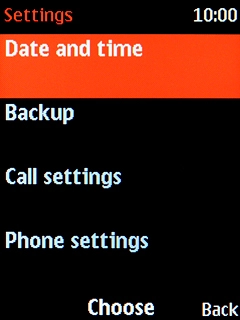
Select Settings.
Step 2 of 10

1. Find "Call forwarding"

Select Settings.

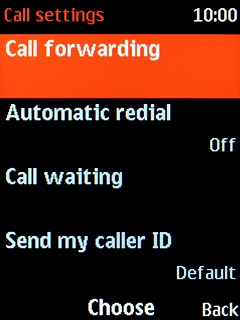
Select Call settings.
Step 3 of 10

1. Find "Call forwarding"

Select Call settings.

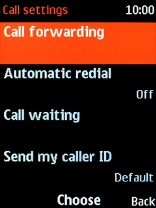
Select Call forwarding.
Step 4 of 10

1. Find "Call forwarding"

Select Call forwarding.

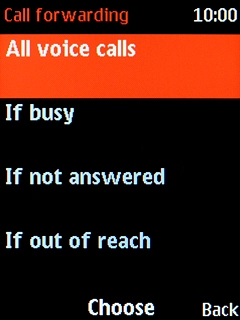
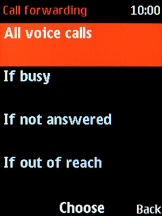
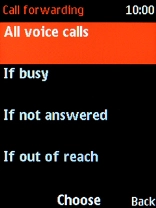
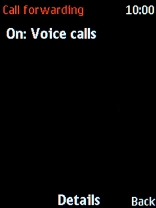
Select the required divert type.
Step 5 of 10

2. Divert calls to voicemail

Select the required divert type.

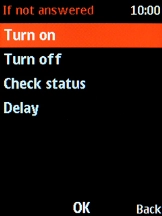
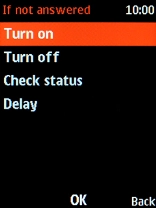
Select Delay.
Step 6 of 10

2. Divert calls to voicemail

Select Delay.

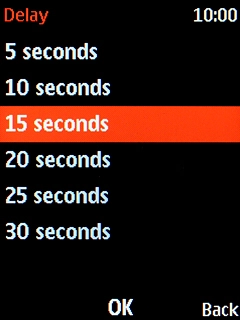
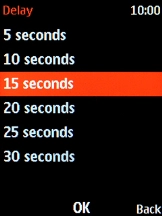
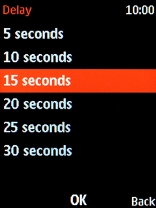
Select the required setting.
Step 7 of 10

2. Divert calls to voicemail

Select the required setting.

Select Turn on.
Step 8 of 10

2. Divert calls to voicemail

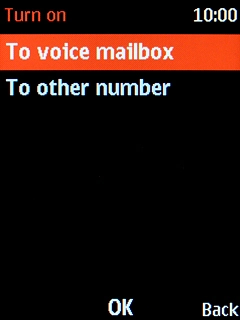
Select Turn on.

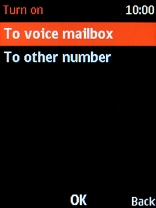
Select To voice mailbox.
Step 9 of 10

2. Divert calls to voicemail

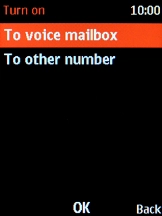
Select To voice mailbox.

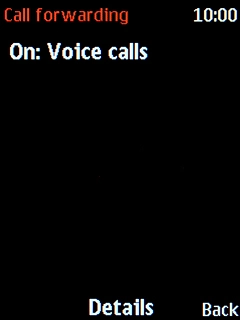
Press Disconnect to return to the home screen.
Step 10 of 10

3. Return to the home screen

Press Disconnect to return to the home screen.

1. Find "Call forwarding"

Press the Navigation key.
Select Settings.
Select Call settings.
Select Call forwarding.

2. Divert calls to voicemail

Select the required divert type.
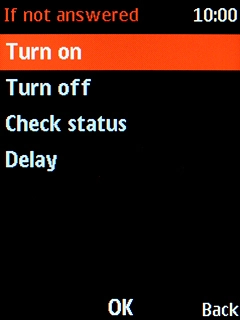
Select Delay.
Select the required setting.
Select Turn on.
Select To voice mailbox.

3. Return to the home screen

Press Disconnect to return to the home screen.

Thank you for your evaluation!

Get information on...

Or select...

Another device