Samsung Nexus S

Samsung Nexus S

Turn your phone on and off - Samsung Nexus S

Read help info

Follow these instructions to turn your phone on and off.
Before using your phone, you need to insert your SIM and the battery. Click here to see how.

Press On/Off until your phone is turned on.
Step 1 of 6

Turn on your phone

Press On/Off until your phone is turned on.
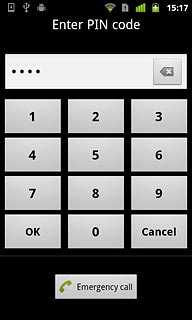
Key in your PIN and press OK.
Step 2 of 6

Enter PIN

Key in your PIN and press OK.

The PIN is used to protect your SIM from unauthorised use. Click here for more information about the PIN.
If you enter an incorrect PIN three times in a row, your SIM will be blocked.

Samsung Nexus S
Step 3 of 6

SIM rejected

If the display tells you that your SIM isn't accepted, you may have a faulty SIM or SIM reader. Your phone can also be locked to another operator. Contact this operator for further information.

Press and hold On/Off.
Step 4 of 6

Turn off your phone

Press and hold On/Off.

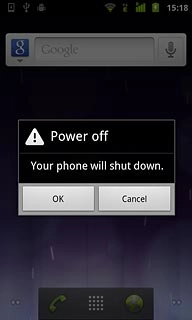
Press Power off.
Step 5 of 6

Turn off your phone

Press Power off.

Press OK.
Step 6 of 6

Turn off your phone

Press OK.

Turn on your phone

Press On/Off until your phone is turned on.

Enter PIN

Key in your PIN and press OK.
The PIN is used to protect your SIM from unauthorised use. Click here for more information about the PIN.
If you enter an incorrect PIN three times in a row, your SIM will be blocked.
SIM rejected

If the display tells you that your SIM isn't accepted, you may have a faulty SIM or SIM reader. Your phone can also be locked to another operator. Contact this operator for further information.
Samsung Nexus S

Turn off your phone

Press and hold On/Off.
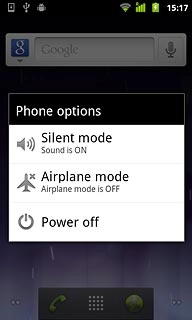
Press Power off.
Press OK.

Thank you for your evaluation!

Get information on...

Or select...

Another device