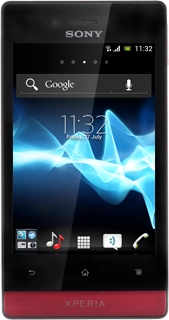
Sony Xperia miro

Sony Xperia miro

Use browser - Sony Xperia miro

Read help info

You can view web pages using your phone's browser. Follow these instructions to use the browser.
You need to set up your phone for internet to use this function. Click here for information on how to set up your phone for internet.

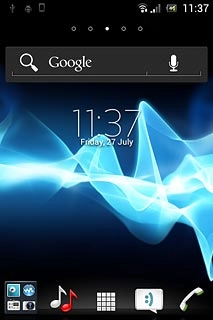
Press the menu icon.
Step 1 of 12

Find "Browser"

Press the menu icon.
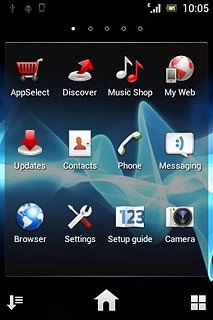
Press Browser.
Step 2 of 12

Find "Browser"

Press Browser.

Sony Xperia miro
Step 3 of 12

Use browser

Follow the steps below to use the browser.
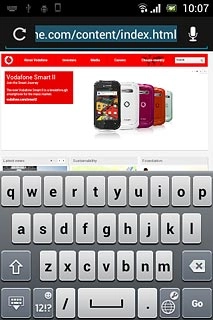
Press the address bar at the top of the display.
Step 4 of 12

Enter web address

Press the address bar at the top of the display.

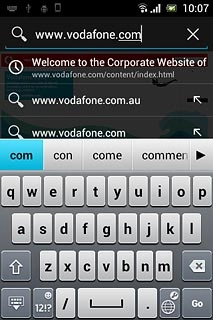
Key in the address of the required web page and press Go.

Step 5 of 12

Enter web address

Key in the address of the required web page and press Go.

Press the Menu key.
Step 6 of 12

Add current web page to your bookmarks

Press the Menu key.

Press Save to bookmarks.Edit the name of the bookmark, if required.
Step 7 of 12

Add current web page to your bookmarks

Press Save to bookmarks.
Edit the name of the bookmark, if required.

Press OK.
Step 8 of 12

Add current web page to your bookmarks

Press OK.

Press the Menu key.
Step 9 of 12

Go to bookmark

Press the Menu key.

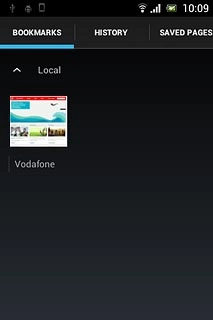
Press Bookmarks.
Step 10 of 12

Go to bookmark

Press Bookmarks.

Press the required bookmark.
Step 11 of 12

Go to bookmark

Press the required bookmark.

Press the Home key to return to standby mode.
Step 12 of 12

Exit

Press the Home key to return to standby mode.

Find "Browser"

Press the menu icon.
Press Browser.

Use browser

Follow the steps below to use the browser.
Sony Xperia miro

Enter web address

Press the address bar at the top of the display.
Key in the address of the required web page and press Go.

Add current web page to your bookmarks

Press the Menu key.
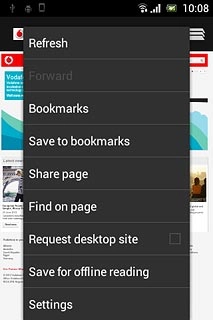
Press Save to bookmarks.
Edit the name of the bookmark, if required.
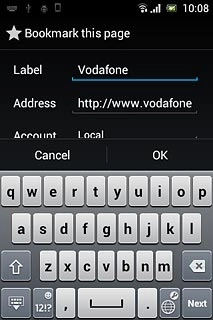
Press OK.

Go to bookmark

Press the Menu key.
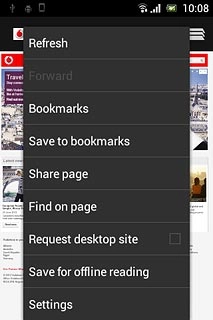
Press Bookmarks.
Press the required bookmark.

Exit

Press the Home key to return to standby mode.

Thank you for your evaluation!

Get information on...

Or select...

Another device