

Find "Start & Quit"
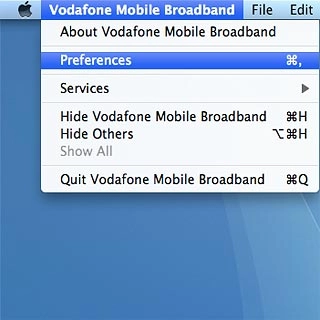
Click Vodafone Mobile Broadband.
Find "Start & Quit"
Click Preferences.
Find "Start & Quit"
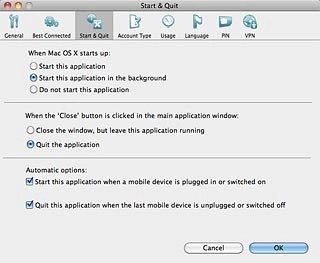
Click Start & Quit.


Select option
Select one of the following options:
Select setting for automatic start-up when computer is turned on, go to 2a.
Turn automatic start-up when connecting USB modem to computer on or off, go to 2b.
2a - Select setting for automatic start-up when computer is turned on
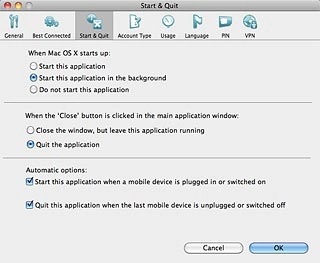
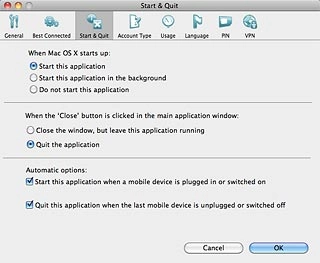
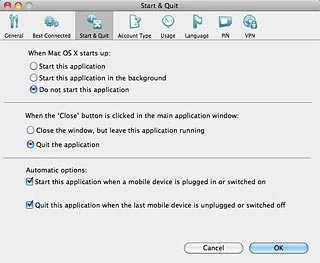
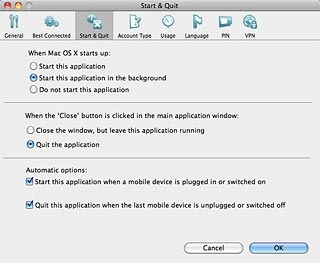
Highlight one of the following options below When Mac OS X starts up:
2a - Select setting for automatic start-up when computer is turned on
Start this application

2a - Select setting for automatic start-up when computer is turned on
Start this application in the background
2a - Select setting for automatic start-up when computer is turned on
Do not start this application
2b - Turn automatic start-up when connecting USB modem to computer on or off
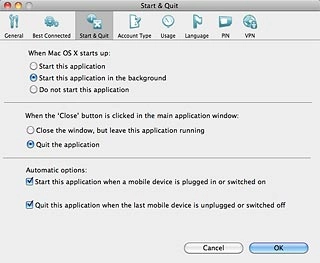
Click the box next to Start this application when a mobile device is plugged in or switched on to turn automatic start-up when connecting USB modem to computer on or off.
2b - Turn automatic start-up when connecting USB modem to computer on or off
When the box next to the menu item is ticked (V), the function is turned on.
Exit
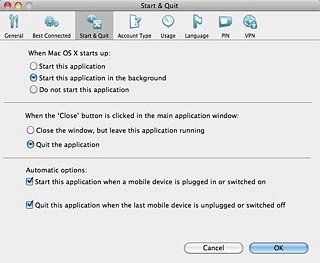
Click OK to close the window.
Find "Start & Quit"
Select option
Select setting for automatic start-up when computer is turned on, go to 2a.
Turn automatic start-up when connecting USB modem to computer on or off, go to 2b.
2a - Select setting for automatic start-up when computer is turned on
2b - Turn automatic start-up when connecting USB modem to computer on or off
Exit
Thank you for your evaluation!

Thank you for your evaluation!