

Apple iPhone 4S (iOS5)

Apple iPhone 4S

Call voicemail - Apple iPhone 4S (iOS5)

Read help info

Your price plan includes voicemail where callers can leave a voice message when you don't answer a call. Follow these instructions to listen to your voice messages.
Before you can listen to your voice messages, you need to save the voicemail number. Click here for information on how to save the voicemail number.

Press Phone.
Step 1 of 5

Call voicemail

Press Phone.
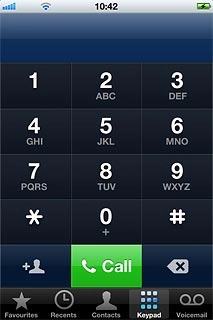
Press Voicemail.
Step 2 of 5

Call voicemail

Press Voicemail.

Apple iPhone 4S (iOS5)
Step 3 of 5

Check voice messages

Follow the instructions from your voicemail.
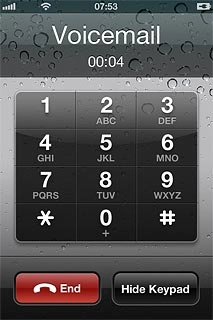
Press End to end the call.
Step 4 of 5

End call

Press End to end the call.

Press the Home key to return to standby mode.
Step 5 of 5

End call

Press the Home key to return to standby mode.

Call voicemail

Press Phone.
Press Voicemail.

Check voice messages

Follow the instructions from your voicemail.
Apple iPhone 4S (iOS5)

End call

Press End to end the call.
Press the Home key to return to standby mode.

Thank you for your evaluation!

Get information on...

Or select...

Another device