Nokia 300 Asha

Nokia 300 Asha

Transfer files via Bluetooth - Nokia 300 Asha

Read help info

Bluetooth is a wireless connection which can be used to transfer files between two devices or to establish a connection to other devices, such as a wireless headset or keypad. Follow these instructions to transfer files via Bluetooth.

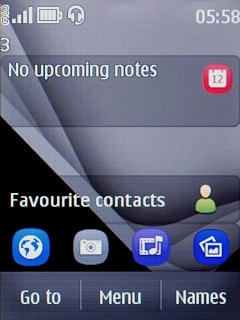
Press Menu.
Step 1 of 8

Find "Photos"

Press Menu.
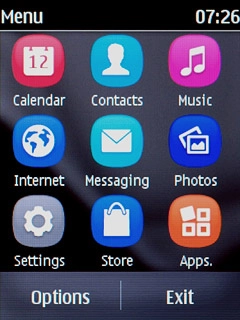
Press Photos.
Step 2 of 8

Find "Photos"

Press Photos.

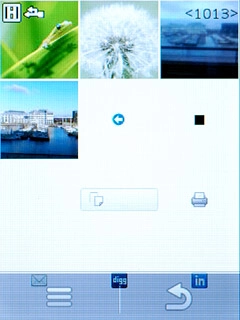
Go to the required folder.Press and hold the required file until a pop-up menu is displayed.
Step 3 of 8

Select file

Go to the required folder.
Press and hold the required file until a pop-up menu is displayed.
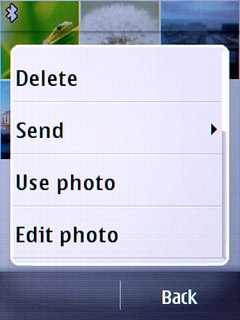
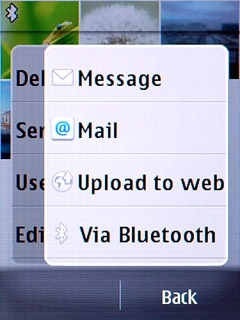
Press Send.
Step 4 of 8

Select file

Press Send.

Press Via Bluetooth.
Step 5 of 8

Select file

Press Via Bluetooth.

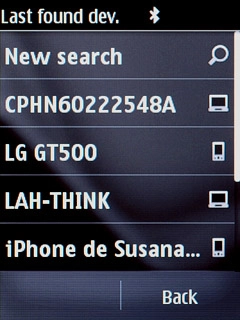
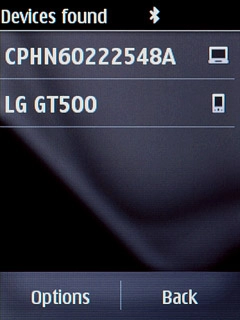
Press New search.Your phone now searches for devices and after a moment, a list of Bluetooth devices within range is displayed.
Step 6 of 8

Transfer file via Bluetooth

Press New search.
Your phone now searches for devices and after a moment, a list of Bluetooth devices within range is displayed.

Press the required Bluetooth device.You also need to accept the transfer on the other device.The file is sent.
Step 7 of 8

Transfer file via Bluetooth

Press the required Bluetooth device.
You also need to accept the transfer on the other device.
The file is sent.

Press Disconnect to return to standby mode.
Step 8 of 8

Exit

Press Disconnect to return to standby mode.

Find "Photos"

Press Menu.
Press Photos.

Select file

Go to the required folder.
Press and hold the required file until a pop-up menu is displayed.
Press Send.
Press Via Bluetooth.

Transfer file via Bluetooth

Press New search.
Your phone now searches for devices and after a moment, a list of Bluetooth devices within range is displayed.
Press the required Bluetooth device.
You also need to accept the transfer on the other device.
The file is sent.

Exit

Press Disconnect to return to standby mode.

Thank you for your evaluation!

Get information on...

Or select...

Another device