Nokia C3-01

Nokia C3-01

Change barring password - Nokia C3-01

Read help info

Follow these instructions to change your barring password.

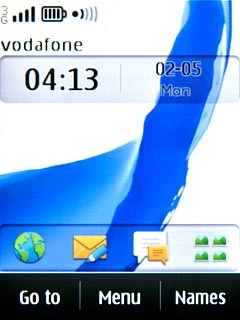
Press Menu.
Step 1 of 9

Find "Change barr. passw."

Press Menu.
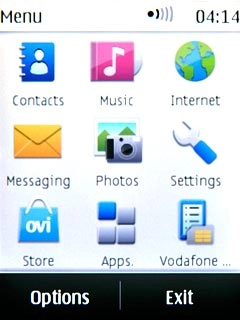
Press Settings.
Step 2 of 9

Find "Change barr. passw."

Press Settings.
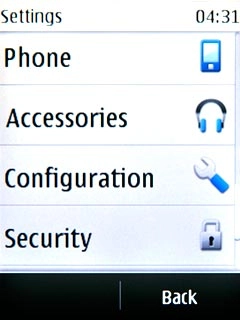
Press Security.
Step 3 of 9

Find "Change barr. passw."

Press Security.
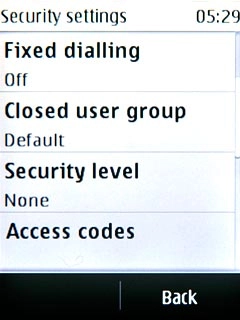
Press Access codes.
Step 4 of 9

Find "Change barr. passw."

Press Access codes.
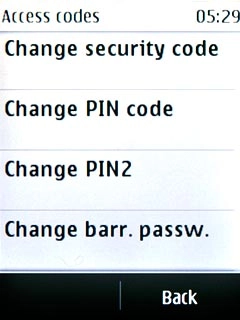
Press Change barr. passw..
Step 5 of 9

Find "Change barr. passw."

Press Change barr. passw..
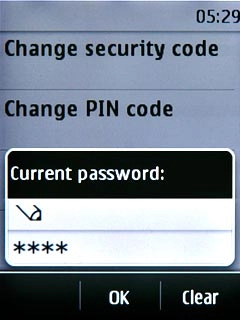
Key in your current barring password (default is 0000) and press OK.
Step 6 of 9

Change barring password

Key in your current barring password (default is 0000) and press OK.

Key in a new call barring password and press OK.
Step 7 of 9

Change barring password

Key in a new call barring password and press OK.

Key in the new call barring password again and press OK.A request to change the setting is sent to the network.
Step 8 of 9

Change barring password

Key in the new call barring password again and press OK.
A request to change the setting is sent to the network.

Press Disconnect to return to standby mode.
Step 9 of 9

Exit

Press Disconnect to return to standby mode.

Find "Change barr. passw."

Press Menu.
Press Settings.
Press Security.
Press Access codes.
Press Change barr. passw..

Change barring password

Key in your current barring password (default is 0000) and press OK.
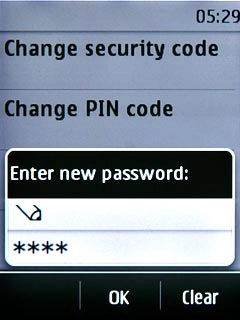
Key in a new call barring password and press OK.
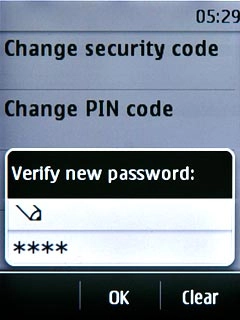
Key in the new call barring password again and press OK.
A request to change the setting is sent to the network.
Exit

Press Disconnect to return to standby mode.

Thank you for your evaluation!

Get information on...

Or select...

Another device