Samsung Galaxy Tab 2 7.0

Samsung Galaxy Tab 2 7.0

Make a call with hidden caller identification - Samsung Galaxy Tab 2 7.0

Read help info

You can make a call without sending your own number (caller identification). Follow these instructions to make a call with hidden caller identification.

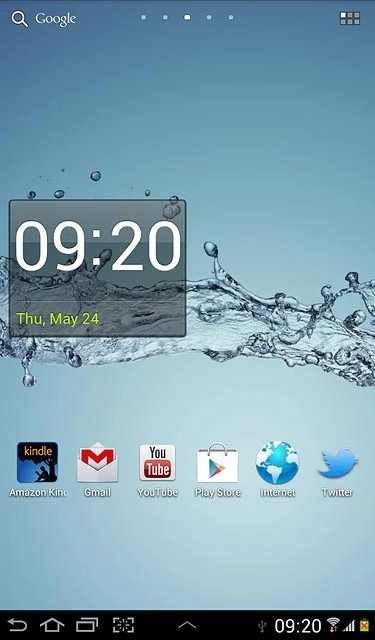
Press the menu icon.
Step 1 of 4

Make a call with hidden caller identification

Press the menu icon.
Please note that this function only hides your number for the specific call.
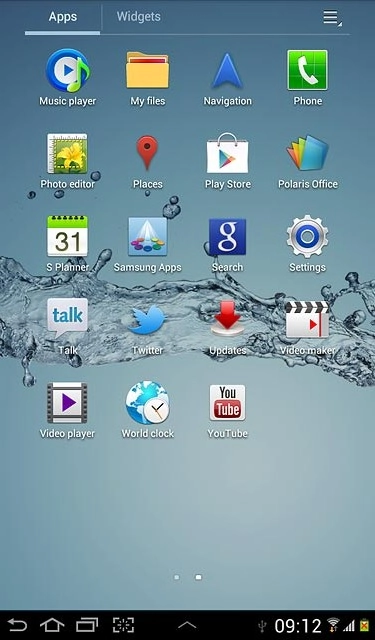
Press Phone.
Step 2 of 4

Make a call with hidden caller identification

Press Phone.
Please note that this function only hides your number for the specific call.
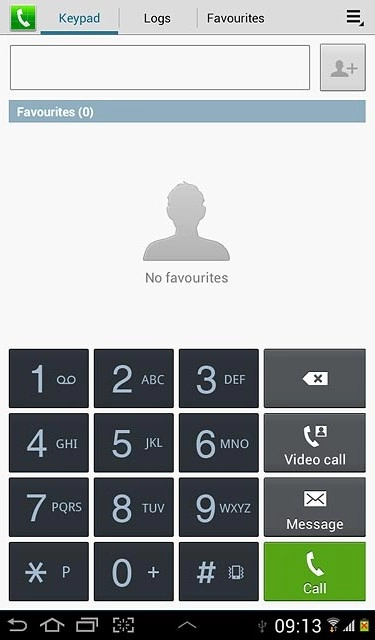
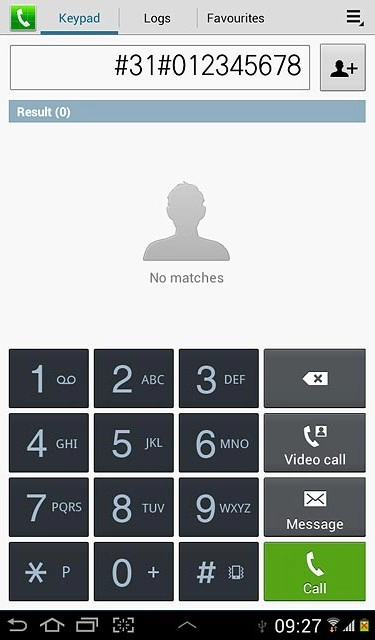
Press the Keypad tab.Key in #31# followed by the number you want to call.
Step 3 of 4

Make a call with hidden caller identification

Press the Keypad tab.
Key in #31# followed by the number you want to call.
Please note that this function only hides your number for the specific call.
Example: #31#012345678Press Call.
Step 4 of 4

Make a call with hidden caller identification

Example: #31#012345678
Press Call.

Please note that this function only hides your number for the specific call.

Make a call with hidden caller identification

Press the menu icon.
Please note that this function only hides your number for the specific call.
Press Phone.
Please note that this function only hides your number for the specific call.
Press the Keypad tab.
Key in #31# followed by the number you want to call.
Please note that this function only hides your number for the specific call.
Example: #31#012345678
Press Call.
Please note that this function only hides your number for the specific call.

Thank you for your evaluation!

Get information on...

Or select...

Another device