Samsung Galaxy Young

Samsung Galaxy Young

Cancel all diverts - Samsung Galaxy Young

Read help info

If you no longer wish to divert your calls to your voicemail or another number, you need to cancel the diverts.

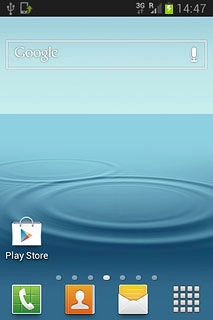
Press the phone icon.
Step 1 of 12

Find "Call forwarding"

Press the phone icon.
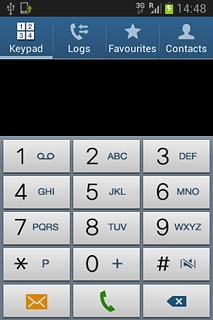
Press the Keypad tab.
Step 2 of 12

Find "Call forwarding"

Press the Keypad tab.
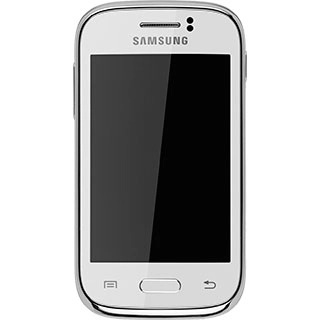
Press the Menu key.
Step 3 of 12

Find "Call forwarding"

Press the Menu key.
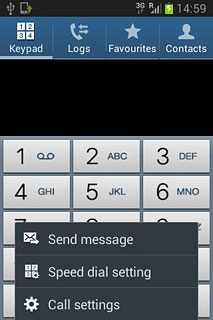
Press Call settings.
Step 4 of 12

Find "Call forwarding"

Press Call settings.

Press Call forwarding.
Step 5 of 12

Find "Call forwarding"

Press Call forwarding.

Samsung Galaxy Young
Step 6 of 12

Cancel all diverts

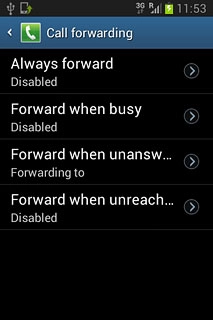
The current settings are displayed.
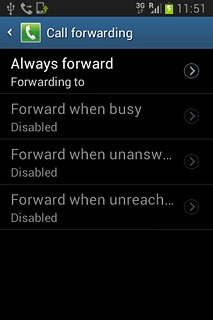
Press one of the following options:Always forward
Step 7 of 12

Cancel all diverts

Press one of the following options:
Always forward
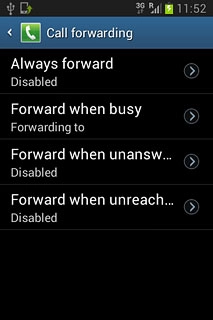
Forward when busy
Step 8 of 12

Cancel all diverts

Forward when busy

Forward when unanswered
Step 9 of 12

Cancel all diverts

Forward when unanswered
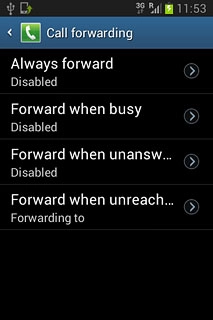
Forward when unreachable
Step 10 of 12

Cancel all diverts

Forward when unreachable
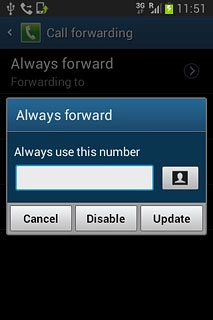
Press Disable.Repeat until all diverts have been cancelled.
Step 11 of 12

Cancel all diverts

Press Disable.
Repeat until all diverts have been cancelled.

Press the Home key to return to the home screen.
Step 12 of 12

Return to the home screen

Press the Home key to return to the home screen.

Find "Call forwarding"

Press the phone icon.
Press the Keypad tab.
Press the Menu key.
Press Call settings.
Press Call forwarding.

Cancel all diverts

The current settings are displayed.
Samsung Galaxy Young
Press one of the following options:
Always forward
Forward when busy
Forward when unanswered
Forward when unreachable
Press Disable.
Repeat until all diverts have been cancelled.

Return to the home screen

Press the Home key to return to the home screen.

Thank you for your evaluation!

Get information on...

Or select...

Another device